Step 1: Enter Text or Braille
Paste a word, sentence, worksheet note, classroom label, greeting card message, short paragraph, or braille cells.
Free online braille translator
Convert English text to braille or translate braille back to English with British and American Grade 1 or Grade 2 settings. Download the result as PNG, JPG, SVG, or ASCII without leaving the page.
Understand the tool
This page combines a tool, landing page, and result gallery so families, friends, and teachers can understand the conversion before they use it.
Paste a word, sentence, worksheet note, classroom label, greeting card message, short paragraph, or braille cells.
Select the braille standard that matches your reader, school, or local convention.
Use Grade 1 for letter-by-letter braille or Grade 2 for a more compact contracted result.
Save braille as PNG, JPG, SVG, or ASCII for printing, sharing, classroom work, or accessible labels.
Use it now
The form works directly on this page. No account, extra page, or popup is needed.
⠠⠓⠁⠏⠏⠽⠀⠃⠊⠗⠹⠐⠙⠂⠀⠠⠑⠍⠍⠁⠲
,HAPPY BIR?"D1 ,EMMA4Powered by Liblouis 3.38.0 translation tables. Review important formal, embossed, or contracted Grade 2 materials with a qualified braille reader.
Long-tail use cases
These sections explain common use cases: quick translation, alphabet learning, classroom labels, and printable output.
A braille translator helps families and teachers turn ordinary English into braille for cards, worksheets, room labels, and short notes. The tool keeps the input, settings, and result in one workspace so nontechnical users can move quickly.
⠠⠹⠁⠝⠅⠀⠽⠳⠀⠿⠀⠓⠑⠇⠏⠬⠲The braille alphabet is useful when a beginner wants to see how English letters become braille cells. This reference also gives crawlers and readers a clear educational section around alphabet-level searches.
Open the full braille alphabet chartTeachers and assistants often need a fast output, not a long lesson. This page solves that by showing downloadable image, SVG, and ASCII formats immediately after generation.
Result gallery
Example results help new visitors judge the output before they type anything, while giving the page fresh conversion-focused content to update over time.
Input: Hello, friend.
⠠⠓⠑⠇⠇⠕⠂ ⠋⠗⠊⠑⠝⠙⠲
A short friendly note exported as American Grade 1 braille.
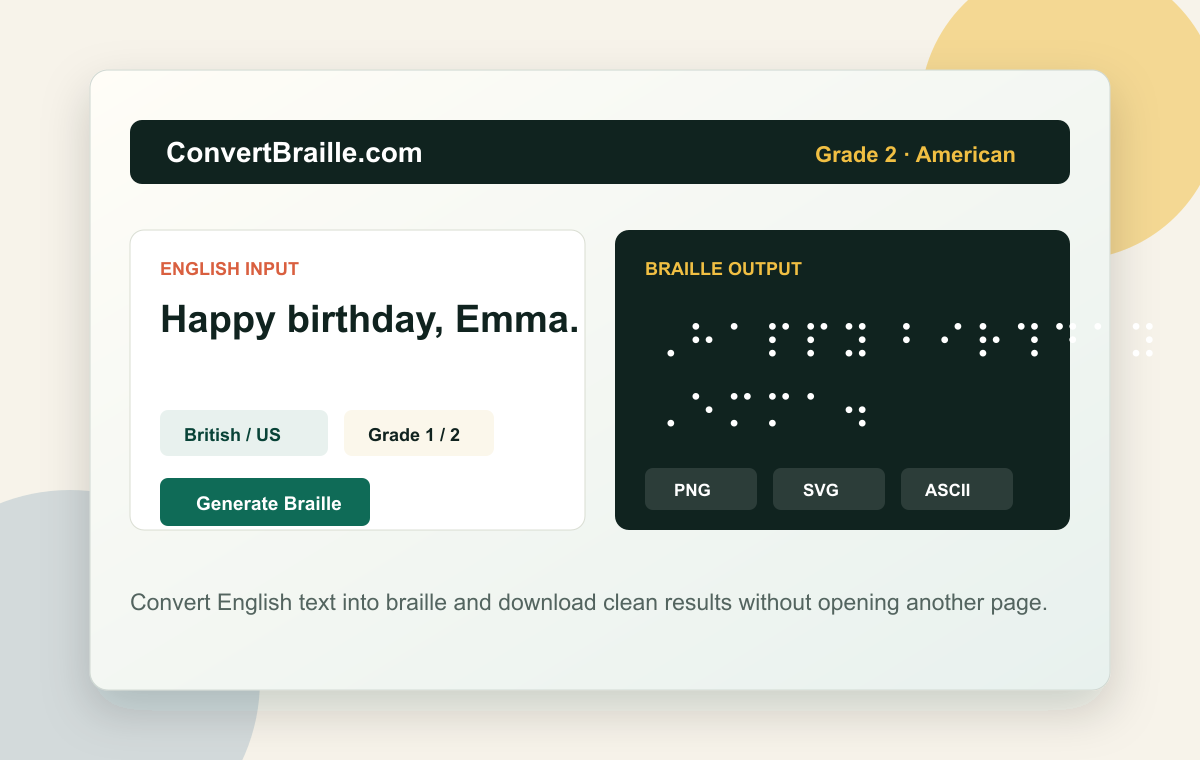
Input: Happy birthday, Emma.
⠠⠓⠁⠏⠏⠽⠀⠃⠊⠗⠹⠐⠙⠂⠀⠠⠑⠍⠍⠁⠲
A greeting card message prepared with the Liblouis U.S. Grade 2 table.
Input: Music Room
⠠⠍⠥⠎⠊⠉ ⠠⠗⠕⠕⠍
A clean SVG-style classroom label for teachers and assistants.
Input: A B C D E
⠠⠁ ⠠⠃ ⠠⠉ ⠠⠙ ⠠⠑
A simple Grade 1 alphabet exercise for new braille learners.
Input: Please bring your book tomorrow.
⠠⠏⠇⠑⠁⠎⠑ ⠃⠗⠊⠝⠛ ⠽⠳⠗ ⠃⠕⠕⠅ ⠞⠕⠍⠕⠗⠗⠕⠺⠲
A classroom reminder exported as Braille ASCII for easy copying.
Input: Registration Desk
⠠⠗⠑⠛⠊⠎⠞⠗⠁⠞⠊⠕⠝ ⠠⠙⠑⠎⠅
An event sign preview that can be downloaded as PNG or SVG.
Helpful answers
These answers cover accuracy, grades, regional settings, the braille alphabet, and export formats.
Start with the reader's expected braille standard, then choose Grade 1 or Grade 2 before generating the result. Grade 1 is easier to inspect because it follows letters more directly, while Grade 2 is shorter and uses contractions. For cards, labels, and classroom drafts, this page gives you a fast preview plus downloadable files. Important documents should still be checked by someone who reads braille.
Yes. Grade 1 braille is uncontracted, so each letter is represented more directly and it is useful for beginners, alphabet practice, and simple labels. Grade 2 braille is contracted, which means common words and letter groups may be shortened. That makes Grade 2 closer to everyday braille reading, but it also depends more on context. For formal Grade 2 work, treat the result as a draft to review.
Yes. PNG and JPG are useful when you want to share an image quickly or place the result in a document. SVG is better when you need a crisp graphic that can scale for print layouts. ASCII braille is a plain-text format that is easier to copy, store, or pass into another workflow. The result stays on the same page so you can try another version immediately.
Both options are English braille systems, but local education, publishing, and organizational conventions may differ. A reader in the United States will usually expect American English braille settings, while a reader in the United Kingdom may expect British settings. The safest choice is the standard used by the person's school, teacher, transcriber, or organization. When in doubt, ask before printing or embossing final materials.
Yes. The alphabet reference shows each English letter beside its braille cell, which helps beginners connect typed letters with dot patterns. It is especially useful when checking Grade 1 output because the relationship is more direct. The alphabet section is not a full braille course, but it gives families and teachers a quick visual reference. For tactile learning, pair the visual preview with embossed or raised-dot materials whenever possible.
No automated translator should be treated as perfect for every use case. Grade 2 braille includes contractions and rules that can depend on surrounding words, punctuation, names, and formatting. Liblouis provides a strong translation engine, but final quality still depends on the table selected and the purpose of the material. Use this tool for drafts, cards, worksheets, and labels, then ask a qualified braille reader or transcriber to review important materials.